
Download OLB appTAN – Secure Online Banking, Mobile TAN, Free Banking App
Overview
OLB appTAN is a free mobile application developed by Oldenburgische Landesbank to streamline and secure online banking authorization processes. Designed for users of the bank’s online banking services, the app enables the convenient approval of financial transactions directly from a smartphone or tablet. It eliminates the need for a dedicated hardware token by delivering transaction authentication numbers (TANs) securely through the mobile device, enhancing both accessibility and protection.
The software is tailored for individuals who frequently conduct online banking activities and value a seamless, secure method of verifying transactions. By integrating with the user’s existing online banking account, OLB appTAN supports real-time approval of payments, transfers, and other financial operations. This makes it particularly useful for users managing personal or business finances on the go, whether at home, in the office, or while traveling.
Registration requires activation through the online banking portal, followed by a physical activation letter sent by mail. Once installed and activated, the app provides a straightforward interface for reviewing and approving transactions. The developer did not provide additional details about the company’s broader software offerings or background beyond the bank’s name.
Key Features & Capabilities
- Mobile TAN Generation – Enables users to receive and approve TANs directly on their smartphone or tablet, replacing the need for a separate hardware device.
- Secure Transaction Approval – Allows real-time verification of online banking transactions, ensuring only authorized actions are processed.
- Multi-Platform Availability – Supports both Android and iOS devices, making it accessible to a wide range of users.
- Seamless Integration – Works directly with the user’s existing online banking account, requiring no additional setup beyond registration.
- Mail-Based Activation – Ensures a secure onboarding process by requiring a physical activation letter sent via postal mail.
Each feature is designed to simplify the authentication workflow. For example, when a user initiates a transfer in online banking, the app displays the transaction details for review before approving the TAN. This helps prevent unauthorized transactions and improves user awareness. The app is especially beneficial for users who prefer mobile-first banking experiences and want to reduce reliance on physical tokens.
User Interface, Workflow & Performance
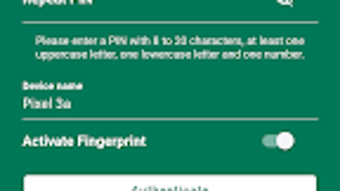
The user interface of OLB appTAN is designed for simplicity and clarity, focusing on quick transaction approval with minimal steps. Navigation is intuitive, with a clean layout that displays transaction details prominently before requiring user confirmation. The workflow follows a logical sequence: receive transaction request → review details → approve with a tap.
While specific performance metrics were not provided, the app is expected to operate efficiently on modern smartphones. The developer did not specify resource usage details, so general behavior patterns are assumed. The app likely maintains low CPU and RAM usage during idle periods, typical of lightweight authentication tools. Stability is likely consistent, as the software is built around a single core function—TAN approval—minimizing the risk of crashes or unexpected behavior.
Performance observations are based on general software behavior patterns. No user-reported issues or benchmark data were included in the provided information. The app does not appear to require constant background activity, which helps preserve battery life and device performance.
Compatibility & System Requirements
OLB appTAN is available for both Android and iOS platforms, supporting a broad range of mobile devices. The application is distributed through the Google Play Store and Apple App Store, ensuring access to users across major mobile ecosystems. The developer did not provide information about specific version requirements or hardware specifications.
Installation size and exact system requirements were not listed. The developer did not specify resource usage details, nor did they provide information about update frequency or license type. Compatibility information is limited to the stated platforms. Users should ensure their device meets the minimum requirements of the respective app store, as these typically include supported OS versions and hardware capabilities.
Platform compatibility information is limited. The developer did not specify whether older device models or low-memory devices are supported.
Pros and Cons
Pros
- Free to download and use
- Eliminates the need for a separate TAN generator device
- Secure authentication via physical activation letter
- Available on both Android and iOS platforms
- Simple, intuitive interface for transaction approval
Cons
- Requires physical activation letter sent by mail
- No information on update frequency or license type
- Resource usage and system requirements not disclosed
- Only supports mobile devices, not desktop platforms
- Dependent on existing online banking account with Oldenburgische Landesbank
FAQ Section
Is OLB appTAN available for Windows or Mac?
OLB appTAN is designed for mobile devices only and is not available as a desktop application for Windows or Mac.
How do I activate OLB appTAN?
Activation requires registering through your online banking account and receiving a physical activation letter by mail. Follow the instructions in the letter to install and set up the app.
Is OLB appTAN safe to use?
The app uses secure authentication methods, including a mail-based activation process, to protect user transactions. However, no specific security certifications or technical details were provided.
Does OLB appTAN require an internet connection?
Yes, the app requires an active internet connection to receive and approve transaction requests from your online banking service.
Can I use OLB appTAN on multiple devices?
The developer did not provide information about multi-device usage or account linking policies.
Final Thoughts + CTA
OLB appTAN offers a modern, secure, and convenient solution for users of Oldenburgische Landesbank who want to simplify their online banking authorization process. By eliminating the need for a physical TAN generator, the app enhances mobility and reduces the risk of losing or misplacing authentication devices. Its straightforward interface and secure onboarding via postal activation letter make it a reliable tool for transaction approval.
While the app lacks detailed technical specifications and update information, its core functionality is well-executed and focused. It is ideal for individuals who prioritize security and convenience in their digital banking experience. For users already with an account at Oldenburgische Landesbank, OLB appTAN is a valuable addition to their financial toolkit.
Download OLB appTAN now







